
Invoicing software for consultants on retainers, hours and projects
Business, IT, marketing, HR or engineering consultants: bill a monthly retainer automatically, charge by the hour, and invoice projects in stages.
Consultants rarely bill the same way twice. One client pays a fixed monthly retainer, another pays by the hour, and a third agreed a project fee split into milestones. Add travel and other expenses, and month end turns into an evening with a spreadsheet.
Good invoicing software for consultants handles all of these in one place. It sends retainer invoices on their own, works out hours times rate, bills each project stage and puts your out-of-pocket costs on the right client’s invoice. GlobalInvoiceHub does all of that, with a free plan to get started. It is the same tool many freelancers use, with extra room for retainers and long projects.
What the best invoicing software for consultants should do
- Send retainer invoices automatically. The same amount on the same day every month, without you remembering.
- Bill by the hour. Enter hours and your rate, and the line total is worked out for you.
- Invoice projects in stages. An upfront payment, milestone invoices, and a final balance that adds up correctly.
- Pass on expenses. Travel, software or materials paid for a client, added to their next invoice.
- Handle international clients. Their currency and the right tax treatment for cross-border work.
- Show who owes what. A clear view of unpaid invoices and how late they are.
How GlobalInvoiceHub works for consultants
You don’t need any accounting knowledge. If you know who you worked for and what you charged, you have everything you need.
Set up your practice
Add your business details, logo and tax number. Save your standard services, such as “Strategy workshop, half day” or “Advisory, per hour”, with their rates.
Choose how each client pays
Make a retainer invoice recurring every month, bill hourly work as hours times rate, or create a project with an advance and milestones.
Add expenses as you go
Record costs like travel or software against the client. They wait in the client’s file until you add them to the next invoice.
Send, track and get paid
Email invoices or share a link. See when they are opened, let clients pay online, and let reminders follow up on anything overdue.
Features consultants use most
- Recurring retainers: monthly, quarterly or any schedule, emailed automatically or saved as drafts to check
- Hourly lines: tick “Charge by the hour” and enter hours and rate
- Project billing: advance, milestones and change orders, with a balance invoice that subtracts what was paid (see project billing)
- Billable expenses: costs recorded for a client appear when you write their next invoice
- Custom fields: add a PO number or engagement reference that prints on every invoice
- Reports: money owed by age, sales by client and a profit and loss report
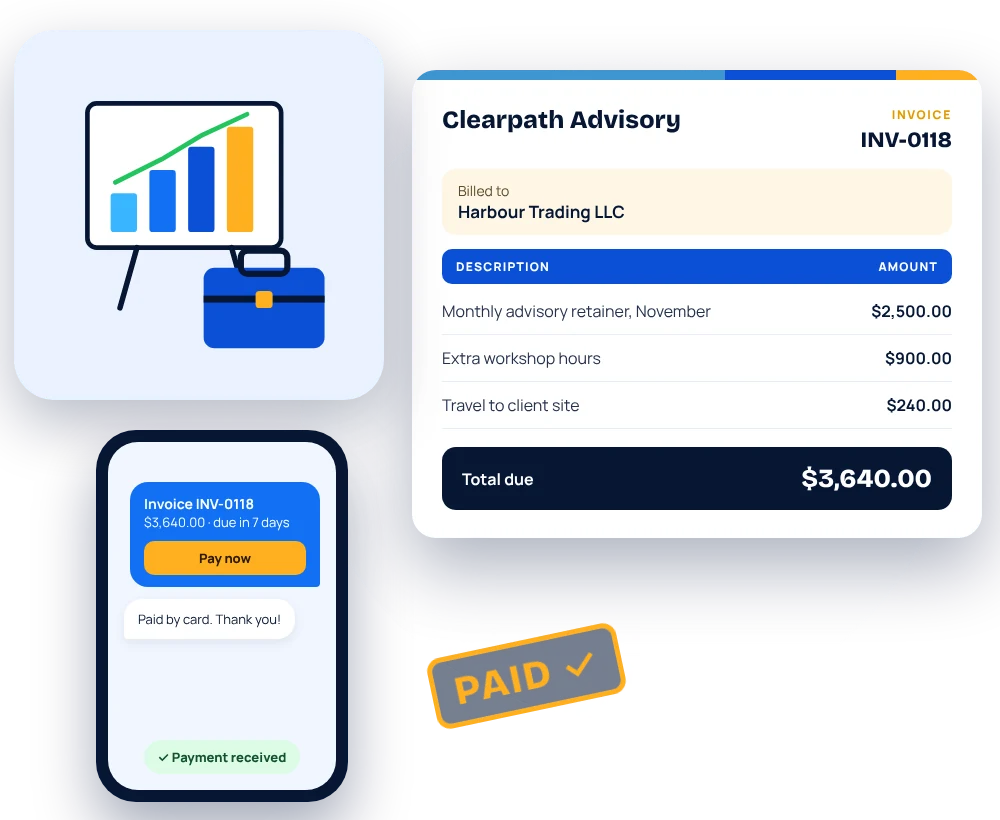
A retainer, extra hours and a passed-on expense on one invoice. Tax is added for you based on where your client is.
Tips to get paid faster as a consultant
- Bill retainers in advance. Invoice at the start of the month for the month ahead, so the work is always paid for.
- Match the client’s paperwork. Ask whether they need a PO number on the invoice. A missing reference is one of the most common reasons for a delay.
- Send to the right person. Address invoices to the person who approves payment as well as your day-to-day contact.
- Keep terms consistent. Use the same payment terms for every client so late payments stand out quickly.
Free for 5 invoices a month
Every template, the tax settings, quotes, online payments and reminders are on the free plan. Pro removes the monthly limit when you need more.
Start free Compare the free plan and ProCan I send the same retainer invoice every month?
Yes. Set it up once as a recurring invoice and choose every month. It is created on the date you pick, and either emailed to the client automatically or saved as a draft for you to check.
Can I mix a retainer and hourly work on one invoice?
Yes. Add the retainer as one line and the extra hours as another line with hours and rate. Expenses for that client can be added in the same invoice.
Can clients see a PO number on my invoices?
Yes. Create a custom field such as “PO number” in Settings and choose to print it. You fill it in on each invoice.
Does it work for clients in other countries?
Yes. Each client is billed in their own currency, and the tax treatment follows where they are, including exports and EU reverse charge.
What does it cost?
The free plan includes 5 invoices and 5 quotes a month and one recurring invoice. Pro removes those limits for one yearly payment, with no monthly bill and auto-renew only if you choose it.
Invoicing software for other businesses
GlobalInvoiceHub is invoicing software for small businesses of every kind. See how it works for these trades too, or browse every industry.
Clients in other countries, their currency, deposits and the right tax. Invoicing software for cleaning businesses
Weekly and fortnightly cleans billed on their own, plus one-off deep cleans. Invoicing software for landscaping
Regular lawn care billed monthly, plus deposits for bigger installs. Invoicing software for roofing contractors
Estimates, deposits, progress payments and change orders for roof jobs. Invoicing software for pool services
Weekly service billed monthly, chemicals and repairs added as needed. Invoicing software for law firms
Hourly and flat-fee matters, retainers and matter numbers on invoices. Invoicing software for glass and glazing
Measured quotes, a deposit before glass is ordered, balance on install. Invoicing software for pet boarding
Booking deposits, per-night stays, add-ons and card payments. Invoicing software for security companies
Installation quotes with deposits and monthly monitoring contracts.
Send your first invoice today.
Free for 5 invoices a month. No card, no setup.
Create free invoiceAlready have an account? Log in