
Invoicing software for small law firms and solo practitioners
Bill hourly or flat-fee matters, request advance retainers, show the matter number on every invoice, and let clients pay online.
Small firms and solo lawyers often lose hours every month to billing. Time notes have to become invoices, each invoice needs the right matter reference, retainers need tracking, and slow payers need a polite but firm follow-up. Big practice management systems can do this, but they are usually priced and built for much larger firms.
For many small practices, the best invoicing software for law firms is one that produces clear invoices quickly, handles retainers properly and gets the money in. GlobalInvoiceHub does that. To be clear about what it is not: it is an invoicing tool, not a trust (IOLTA) accounting or case management system. Consultants use the same retainer and hourly features.
What the best invoicing software for law firms should do
- Bill hourly and flat fees. Hours times rate for litigation work, a fixed fee for a will or a closing.
- Request advance retainers. An invoice for the retainer, and a final invoice that accounts for it.
- Show matter details. A matter number or reference on every invoice so the client’s accounts team can match it.
- Pass on disbursements. Filing fees, courier costs and other expenses added to the client’s bill.
- Accept online payments. Clients increasingly expect to pay legal fees by card.
- Look professional. Your firm’s logo and a clean, sober layout.
How GlobalInvoiceHub works for your law firm
You don’t need any accounting knowledge. If you know who you worked for and what you charged, you have everything you need.
Set up your firm
Add your firm name, logo, address and tax details. Create a custom field such as “Matter number” that prints on every invoice.
Request a retainer
Send an advance (retainer) invoice for the agreed amount before work starts. When it is paid, it is held against the client’s file.
Bill the work
Add hourly lines with hours and rate, or a flat fee for the matter. Add disbursements such as filing fees recorded for that client.
Apply the retainer and get paid
Use the paid retainer on the final invoice so only the balance is due. Clients pay online or by bank transfer, and reminders follow up automatically.
Features law firms use most
- Hourly billing: enter hours and rate for each line, with a description of the work
- Advance (retainer) invoices: request funds up front and use them on later invoices
- Custom fields: matter number, client reference or PO number printed on the invoice
- Billable expenses: filing fees, couriers and other disbursements added to the client’s invoice
- Statements: a statement of account PDF for any client, with every invoice and payment
- Team roles: paralegals as Employees, your bookkeeper as a view-only Accountant
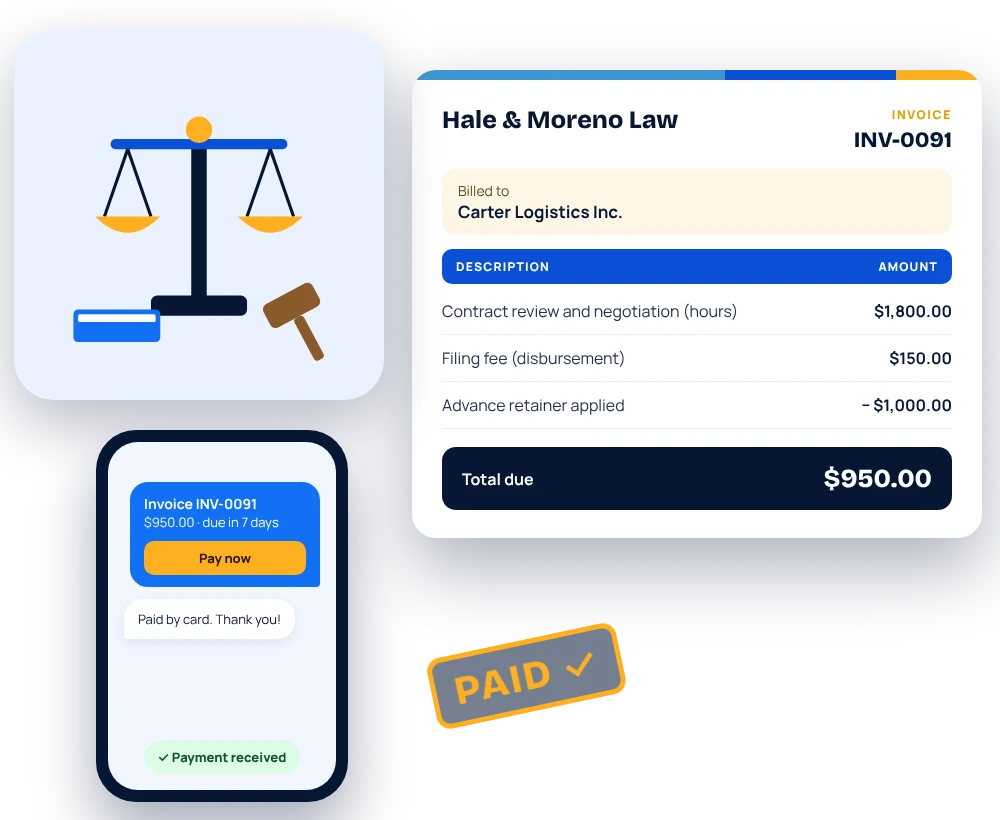
An hourly invoice with a disbursement and the retainer applied. A matter number can be printed on the invoice as a custom field.
Tips to get paid faster for legal work
- Take a retainer. An advance before work starts protects the firm and sets expectations.
- Describe the work clearly. “Drafted and filed motion to dismiss” is easier to approve than “Legal services”.
- Bill monthly on ongoing matters. Smaller, regular invoices are paid faster than one large bill at the end.
- Offer card payments. A Pay now button removes the wait for cheques and bank transfers.
Free for 5 invoices a month
Every template, the tax settings, quotes, online payments and reminders are on the free plan. Pro removes the monthly limit when you need more.
Start free Compare the free plan and ProWhat is the best invoicing software for a small law firm?
It depends on what you need. If you mainly need clear invoices, retainers, matter references and online payments, a simple invoicing tool like GlobalInvoiceHub is often enough. See all features and pricing. If you need trust accounting, conflict checks or case management, you will need practice management software alongside it.
Does GlobalInvoiceHub handle trust (IOLTA) accounts?
No. It records retainer invoices and payments, but it is not a trust accounting system. Keep client trust funds in your trust ledger as your bar rules require.
Can I bill by the hour?
Yes. Tick “Charge by the hour” on a line and enter the hours and your rate. GlobalInvoiceHub works out the total; it does not include a timer, so record time as you do today.
Can I show a matter number on invoices?
Yes. Create a custom field such as “Matter number”, choose to print it, and fill it in on each invoice.
Can clients pay legal fees online?
Yes. Connect your own Stripe, Razorpay or PayPal account and invoices get a Pay now button. Check your bar’s rules on card payments for retainers.
Invoicing software for other businesses
GlobalInvoiceHub is invoicing software for small businesses of every kind. See how it works for these trades too, or browse every industry.
Clients in other countries, their currency, deposits and the right tax. Invoicing software for consultants
Monthly retainers, hourly work, milestones and expenses on one invoice. Invoicing software for cleaning businesses
Weekly and fortnightly cleans billed on their own, plus one-off deep cleans. Invoicing software for landscaping
Regular lawn care billed monthly, plus deposits for bigger installs. Invoicing software for roofing contractors
Estimates, deposits, progress payments and change orders for roof jobs. Invoicing software for pool services
Weekly service billed monthly, chemicals and repairs added as needed. Invoicing software for glass and glazing
Measured quotes, a deposit before glass is ordered, balance on install. Invoicing software for pet boarding
Booking deposits, per-night stays, add-ons and card payments. Invoicing software for security companies
Installation quotes with deposits and monthly monitoring contracts.
Send your first invoice today.
Free for 5 invoices a month. No card, no setup.
Create free invoiceAlready have an account? Log in