
Invoice software for landscaping businesses, from mowing to full installs
Bill regular lawn care on its own, quote patios and planting with a deposit up front, and add materials to the invoice without losing receipts.
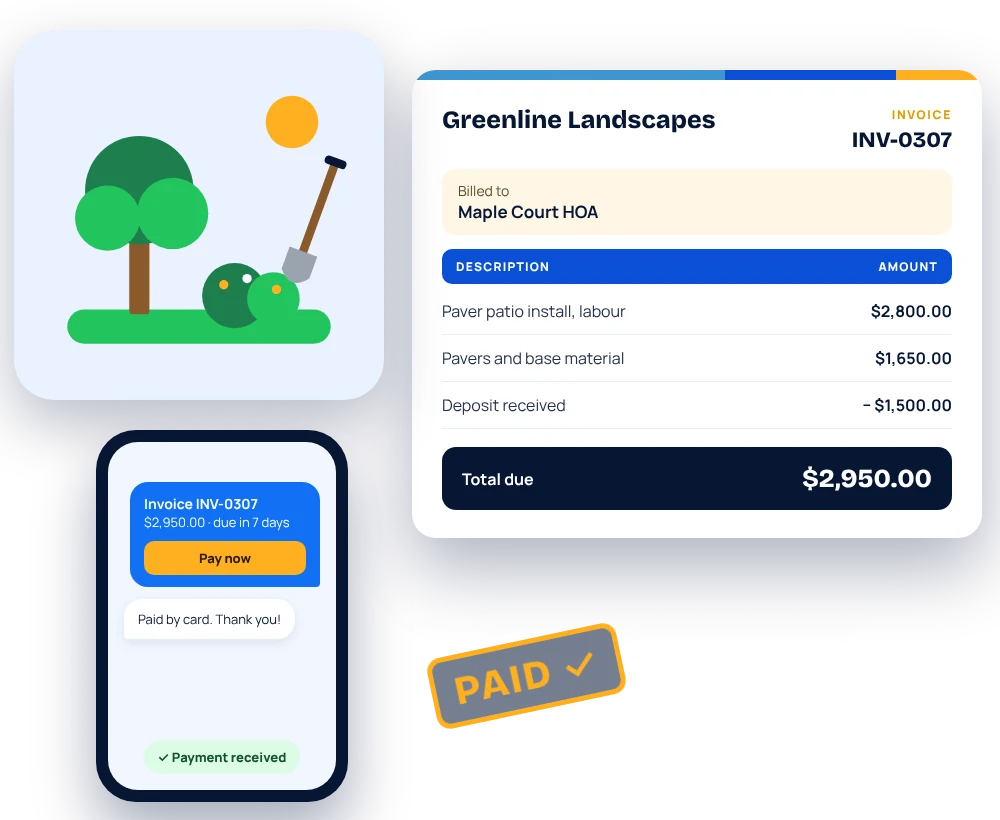
Landscaping work comes in two shapes. There is the steady work, such as weekly mowing, hedge trimming and seasonal clean-ups for the same customers all year. Then there are the bigger jobs, such as a new patio, a retaining wall or a garden redesign, where you spend real money on materials before the customer pays you anything.
The best invoice software for landscaping handles both. It bills your regular customers automatically, lets you quote the big jobs and take a deposit, adds the stone, soil and plants you bought to the final bill, and lets customers pay by card. GlobalInvoiceHub does all of this from your phone, between jobs. Roofers and pool companies use it the same way, so see our pages for roofing contractors and pool services too.
What the best invoice software for landscaping should do
- Bill maintenance customers automatically. Weekly or monthly lawn care invoices that go out without you thinking about them.
- Quote installs clearly. Line by line, with materials and labour, so the customer knows what they are paying for.
- Take a deposit before you buy materials. Ask for part of the price up front on bigger jobs.
- Add materials to the invoice. Stone, mulch, plants and hire costs added to the right customer’s bill.
- Show the job address. Property managers and landlords need to know which property the work was for.
- Get paid from the field. Send the invoice from your phone and let the customer pay by card.
How GlobalInvoiceHub works for your landscaping business
You don’t need any accounting knowledge. If you know who you worked for and what you charged, you have everything you need.
Save your services and prices
Add your usual work, such as “Lawn mowing, small garden”, “Hedge trimming per hour” or “Mulch per cubic yard”, so you can add it to any invoice in a tap.
Set up maintenance customers
Make each maintenance invoice recurring, every week or every month. It is created on the right day and emailed, or saved as a draft for you to check.
Quote the big jobs
Send a quote for an install. When the customer accepts online, create a project, ask for a deposit, and bill the rest in stages or when you finish with project billing.
Add materials and get paid
Record what you spent on materials for the job and add it to the invoice. Customers pay online, and late payers get automatic reminders.
Features landscapers use most
- Recurring invoices: weekly, every 2 weeks or monthly maintenance billed automatically
- Quotes with e-signature: customers accept online, and the quote becomes an invoice
- Deposits and project billing: an advance before you start, milestones for long jobs, and a balance invoice that adds up
- Billable expenses: materials and equipment hire bought for a job, added to that customer’s invoice
- Job address: a separate service address on each invoice for the property you worked on
- Photos on invoices: attach before and after photos that the customer can see with the invoice
A balance invoice after a deposit. In the app, the deposit is subtracted automatically when you bill the rest of a project.
Tips to get paid faster for landscaping work
- Take a deposit on installs. Ask for enough up front to cover materials, often 30% to 50%.
- Bill maintenance at the start of the month. Customers are used to paying for regular services in advance.
- Itemise materials. Listing pavers, soil and plants separately answers questions before the customer asks them.
- Offer card payments. Homeowners pay faster when they can tap Pay now on their phone. See how online payments work.
Free for 5 invoices a month
Every template, the tax settings, quotes, online payments and reminders are on the free plan. Pro removes the monthly limit when you need more.
Start free Compare the free plan and ProCan I bill lawn care customers automatically?
Yes. Create a recurring invoice for each customer, every week, every 2 weeks or every month. It goes out on its own, or waits as a draft if you want to check the visits first.
How do deposits work?
Create a project with the agreed price and an advance such as 30%. Send the advance invoice before you start. When you finish, the balance invoice subtracts the deposit automatically.
Can I add materials I bought to the invoice?
Yes. Record the cost as an expense for that customer and mark it to charge them. It appears when you write their next invoice, so nothing is forgotten.
Can I send invoices from my phone?
Yes. GlobalInvoiceHub works in the browser on any phone. Create the invoice on site and email it or send the link on WhatsApp before you leave.
What happens if the job grows?
Add a change order to the project, for example extra planting or a longer wall. The project total and the balance invoice update to include it.
Invoicing software for other businesses
GlobalInvoiceHub is invoicing software for small businesses of every kind. See how it works for these trades too, or browse every industry.
Clients in other countries, their currency, deposits and the right tax. Invoicing software for consultants
Monthly retainers, hourly work, milestones and expenses on one invoice. Invoicing software for cleaning businesses
Weekly and fortnightly cleans billed on their own, plus one-off deep cleans. Invoicing software for roofing contractors
Estimates, deposits, progress payments and change orders for roof jobs. Invoicing software for pool services
Weekly service billed monthly, chemicals and repairs added as needed. Invoicing software for law firms
Hourly and flat-fee matters, retainers and matter numbers on invoices. Invoicing software for glass and glazing
Measured quotes, a deposit before glass is ordered, balance on install. Invoicing software for pet boarding
Booking deposits, per-night stays, add-ons and card payments. Invoicing software for security companies
Installation quotes with deposits and monthly monitoring contracts.
Send your first invoice today.
Free for 5 invoices a month. No card, no setup.
Create free invoiceAlready have an account? Log in