
Invoicing software for roofing contractors: estimates, deposits and progress payments
Send a clear estimate, take a deposit before materials are ordered, bill in stages, and add surprises like rotten decking as a change order.
Roofing jobs are expensive, and the money moves in stages. You give an estimate, order shingles or metal, take a deposit, start the tear-off, and sometimes find damaged decking that changes the price. If the paperwork falls behind, you end up chasing the final payment while arguing about what was agreed.
So what’s the best invoicing software for roofing contractors? One that turns an estimate into a project, takes a deposit, bills progress payments, records changes properly and shows the customer what is left to pay. GlobalInvoiceHub does this, and you can attach photos of the damage so the customer sees why the price changed. Glazing firms bill in a very similar way, as our page on invoicing for glass companies shows.
What the best invoicing software for roofing contractors should do
- Turn estimates into jobs. An estimate the homeowner accepts online, which becomes the project you bill against.
- Take a deposit up front. Cover materials before they are ordered.
- Bill progress payments. For example, a payment when materials arrive and another when the roof is on.
- Handle change orders. Extra decking, flashing or vents added to the job with a clear price.
- Attach photos. Show the customer the damage and the finished work with the invoice.
- Work out the balance correctly. The final invoice should subtract every payment already made.
How GlobalInvoiceHub works for your roofing business
You don’t need any accounting knowledge. If you know who you worked for and what you charged, you have everything you need.
Send the estimate
Create it as a quote and list the tear-off, materials, labour and disposal. Set a valid-until date. The homeowner accepts online with a signature, or declines with a reason.
Create the project and take a deposit
From the accepted estimate, create a project with the agreed price using project billing. Send the deposit invoice, for example 30%, before you order materials.
Bill progress and changes
Invoice each stage as it is done. If you find rotten decking, add a change order and attach photos to its invoice, so the customer sees the reason and the cost.
Send the final invoice
The balance invoice adds any change orders and subtracts the deposit and progress payments. The customer can pay online.
Features roofing contractors use most
- Estimates with e-signature: homeowners accept online, with their name and signature recorded
- Project billing: deposit, progress payments as percentages or amounts, and an automatic balance
- Change orders: extra work added to the project total with its own invoice or on the final bill
- Photo attachments: add photos to an invoice or estimate and let the customer view them
- Job address: the property address on every invoice, separate from the billing address
- Team members: let your office manager or estimator create estimates and invoices
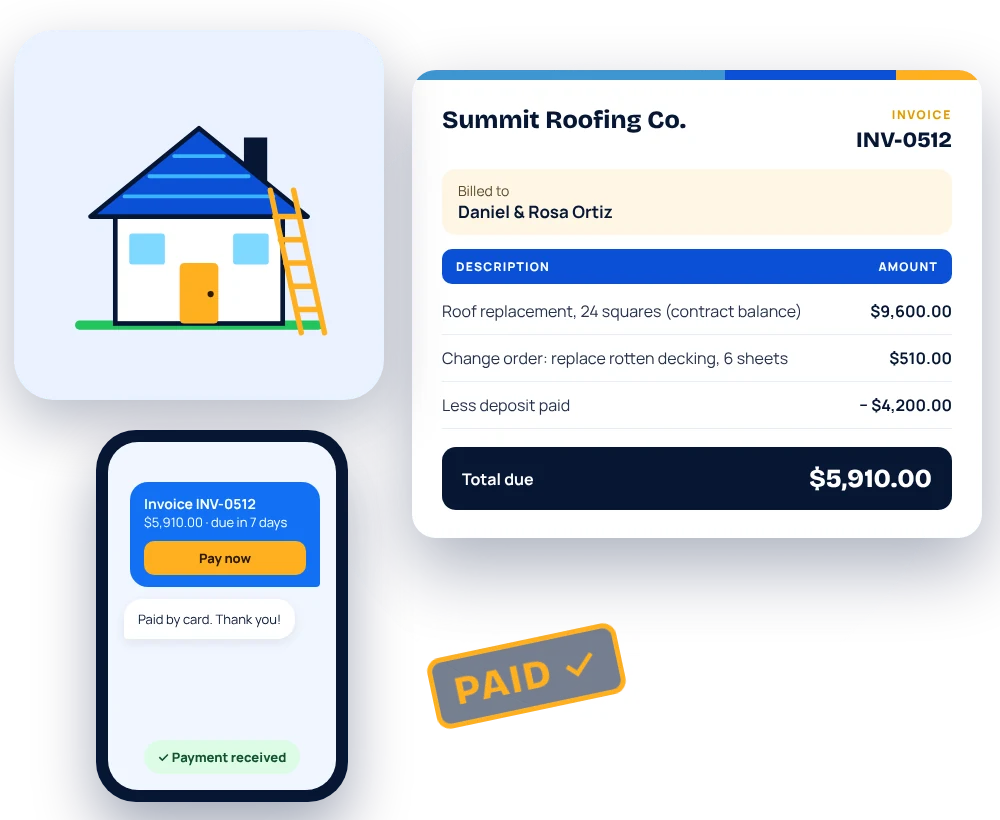
A final invoice with a change order and the deposit subtracted. The app works these lines out for you from the project.
Tips to get paid faster for roofing work
- Put everything in the estimate. Tear-off, disposal, underlayment and flashing listed separately leave less room for disputes.
- Get changes approved in writing. Agree each change before doing the work, and keep a photo of the problem.
- Bill each stage promptly. Send the progress invoice on the day the stage is finished.
- Make the final payment easy. A Pay now link on the final invoice gets the balance in before the next job starts.
Free for 5 invoices a month
Every template, the tax settings, quotes, online payments and reminders are on the free plan. Pro removes the monthly limit when you need more.
Start free Compare the free plan and ProWhat’s the best invoicing software for roofing contractors?
Look for estimates the customer can accept online, deposits, progress payments and change orders that update the final balance. GlobalInvoiceHub includes all of these, and the free plan covers 5 invoices and 5 estimates a month.
Can I take a deposit and bill the rest later?
Yes. Create a project with the agreed price, choose the deposit percentage and send the deposit invoice. The final invoice subtracts it automatically.
How do I handle extra work found during the job?
Add a change order to the project with its price. The project total and the balance invoice include it, and you can attach photos of the problem to the invoice.
Can homeowners pay by card?
Yes. Connect your own Stripe, Razorpay or PayPal account and every invoice gets a Pay now button. The money goes to your account, and we take no fee.
Does it work with insurance jobs?
You can bill the homeowner or another party, attach photos and documents, and add a claim number as a custom field on the invoice. GlobalInvoiceHub does not connect to insurance systems directly.
Invoicing software for other businesses
GlobalInvoiceHub is invoicing software for small businesses of every kind. See how it works for these trades too, or browse every industry.
Clients in other countries, their currency, deposits and the right tax. Invoicing software for consultants
Monthly retainers, hourly work, milestones and expenses on one invoice. Invoicing software for cleaning businesses
Weekly and fortnightly cleans billed on their own, plus one-off deep cleans. Invoicing software for landscaping
Regular lawn care billed monthly, plus deposits for bigger installs. Invoicing software for pool services
Weekly service billed monthly, chemicals and repairs added as needed. Invoicing software for law firms
Hourly and flat-fee matters, retainers and matter numbers on invoices. Invoicing software for glass and glazing
Measured quotes, a deposit before glass is ordered, balance on install. Invoicing software for pet boarding
Booking deposits, per-night stays, add-ons and card payments. Invoicing software for security companies
Installation quotes with deposits and monthly monitoring contracts.
Send your first invoice today.
Free for 5 invoices a month. No card, no setup.
Create free invoiceAlready have an account? Log in