
Invoicing software for glass and glazing companies
Quote by the square foot, take a deposit before you order the glass, and bill the balance when the job is installed.
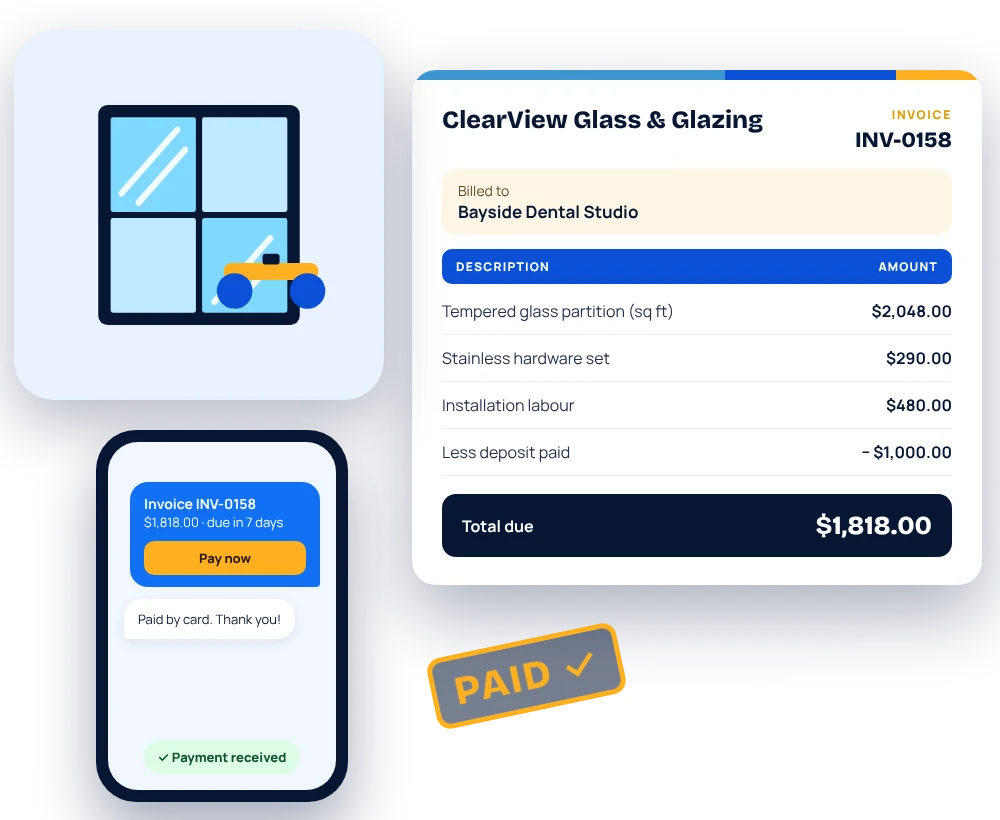
Glass work has a timing problem. You measure, quote and order custom glass that cannot be returned, and only then do you fit it. Whether it is a shower enclosure, a shopfront, double glazing or a mirror wall, you need the customer committed before you spend money with your supplier.
The best invoicing software for glass companies keeps that simple. It sends clear, measured quotes, takes a deposit the moment the customer says yes, records any changes and works out the balance when you install. GlobalInvoiceHub does all of this for small glazing shops and growing install teams alike. Roofing contractors use the same deposit and change order tools.
What the best invoicing software for glass companies should do
- Quote by size and type. Square feet or panels, glass type, hardware and labour on separate lines.
- Take a deposit before ordering. Custom glass should never be ordered on a promise alone.
- Record changes. A different finish, extra hardware or another panel added to the job price.
- Bill the balance on install. With the deposit subtracted, so the customer sees what is left to pay.
- Serve homes and businesses. Homeowners, builders and shop owners each with their own payment terms.
- Accept card payments. Easy for customers on the day of the install.
How GlobalInvoiceHub works for your glass business
You don’t need any accounting knowledge. If you know who you worked for and what you charged, you have everything you need.
Save your products and rates
Add items such as “Clear tempered glass, 10 mm” per square foot, hardware sets and install labour, so quotes take minutes.
Send the measured quote
List each panel or item with its size as the quantity. The customer accepts online with a signature.
Take the deposit and order
Create a project from the accepted quote and send the deposit invoice with project billing. Order the glass once it is paid.
Install and bill the balance
Add any changes as change orders. The balance invoice subtracts the deposit, and the customer can pay online the same day.
Features glass companies use most
- Saved items with units: price per square foot, per panel or per hour, ready for any quote
- Quotes with e-signature: customers accept online, with their name and signature recorded
- Deposits and balance invoices: project billing works out what is left after the deposit
- Change orders: extra panels or hardware added to the project total
- Job address: the installation address on each invoice, separate from billing
- Customer statements: builders and contractors get a statement of every invoice and payment
A balance invoice on installation. In the app the deposit is subtracted automatically from the project.
Tips to get paid faster for glass work
- Never order custom glass without a deposit. Ask for at least the cost of the glass up front.
- Put measurements on the quote. Sizes on the quote stop arguments about what was ordered.
- Set a valid-until date. Glass prices change. A quote with an end date protects your margin.
- Collect the balance on the day. Send the invoice when you finish and offer card payment on the spot.
Free for 5 invoices a month
Every template, the tax settings, quotes, online payments and reminders are on the free plan. Pro removes the monthly limit when you need more.
Start free Compare the free plan and ProQuestions from glass and glazing companies
New to invoicing? Read our guide on how to write an invoice.
Can I quote by the square foot?
Yes. Save an item with the unit “sq ft” and its price, then enter the area as the quantity on each quote or invoice.
How do I take a deposit before ordering glass?
Create a project from the accepted quote, set the deposit, for example 50%, and send the deposit invoice. Order the glass when it is paid.
What if the customer changes the order?
Add a change order to the project with the new price. The balance invoice includes it automatically.
Can builders get a monthly statement?
Yes. Download a statement of account for any customer showing every invoice, payment and the balance owed, and email it to them.
Is there a free plan?
Yes. Send 5 invoices and 5 quotes a month free, with deposits, project billing and online payments included. Pro removes the monthly limit.
Invoicing software for other businesses
GlobalInvoiceHub is invoicing software for small businesses of every kind. See how it works for these trades too, or browse every industry.
Clients in other countries, their currency, deposits and the right tax. Invoicing software for consultants
Monthly retainers, hourly work, milestones and expenses on one invoice. Invoicing software for cleaning businesses
Weekly and fortnightly cleans billed on their own, plus one-off deep cleans. Invoicing software for landscaping
Regular lawn care billed monthly, plus deposits for bigger installs. Invoicing software for roofing contractors
Estimates, deposits, progress payments and change orders for roof jobs. Invoicing software for pool services
Weekly service billed monthly, chemicals and repairs added as needed. Invoicing software for law firms
Hourly and flat-fee matters, retainers and matter numbers on invoices. Invoicing software for pet boarding
Booking deposits, per-night stays, add-ons and card payments. Invoicing software for security companies
Installation quotes with deposits and monthly monitoring contracts.
Send your first invoice today.
Free for 5 invoices a month. No card, no setup.
Create free invoiceAlready have an account? Log in