
Invoicing and payments software for pet boarding facilities
Take a deposit when a stay is booked, bill per night with grooming and extras, and let owners pay by card when they collect their pet.
Boarding kennels, catteries and dog daycares are busiest exactly when everyone else is on holiday. Bookings come in weeks ahead, owners cancel at the last minute, and pick-up time is a rush of happy dogs and people who want to pay quickly and go home. Paper invoices and a cash box struggle to keep up.
Good invoicing and payments software for pet boarding facilities lets you take a deposit when a stay is booked, bill the nights and extras clearly and take payment by card in seconds. GlobalInvoiceHub handles the invoicing and payments side. It does not manage your booking calendar or kennel plan, so keep your booking system for that. For more ideas, see our guide on how to write an invoice.
What the best invoicing and payments software for pet boarding should do
- Take booking deposits. A deposit invoice when a holiday stay is booked, so empty kennels from no-shows cost you less.
- Bill per night. Nights times your nightly rate, with a different rate for each pet if needed.
- Add extras easily. Baths, grooming, medication, walks and special food added in a tap.
- Bill daycare regulars. Weekly or monthly invoices for dogs who come in on set days.
- Take card payments. Owners pay from their phone at pick-up or before they arrive.
- Keep clear records. Every invoice and payment for each owner in one place.
How GlobalInvoiceHub works for your boarding business
You don’t need any accounting knowledge. If you know who you worked for and what you charged, you have everything you need.
Save your prices
Add nightly rates, daycare days, baths, grooming and other extras as saved items, and create a custom field such as “Pet name” that prints on the invoice.
Take the deposit
When a stay is booked, send an advance invoice for the deposit before the dates fill up. The owner pays it online, and it is held against their account.
Bill the stay
At the end of the stay, invoice the nights and any extras, and use the deposit so only the balance is due.
Get paid at pick-up
Send the invoice link by email or WhatsApp. The owner pays by card while you bring their pet out.
Features boarding facilities use most
- Advance (deposit) invoices: request a deposit when a stay is booked and use it on the final invoice
- Saved items: nightly rates, daycare passes and add-ons ready for any invoice
- Custom fields: pet name, breed or booking reference printed on the invoice
- Pay now button: card and online payments into your own Stripe, Razorpay or PayPal account
- Recurring invoices: weekly or monthly billing for regular daycare dogs
- WhatsApp and email: send the invoice in the way each owner prefers
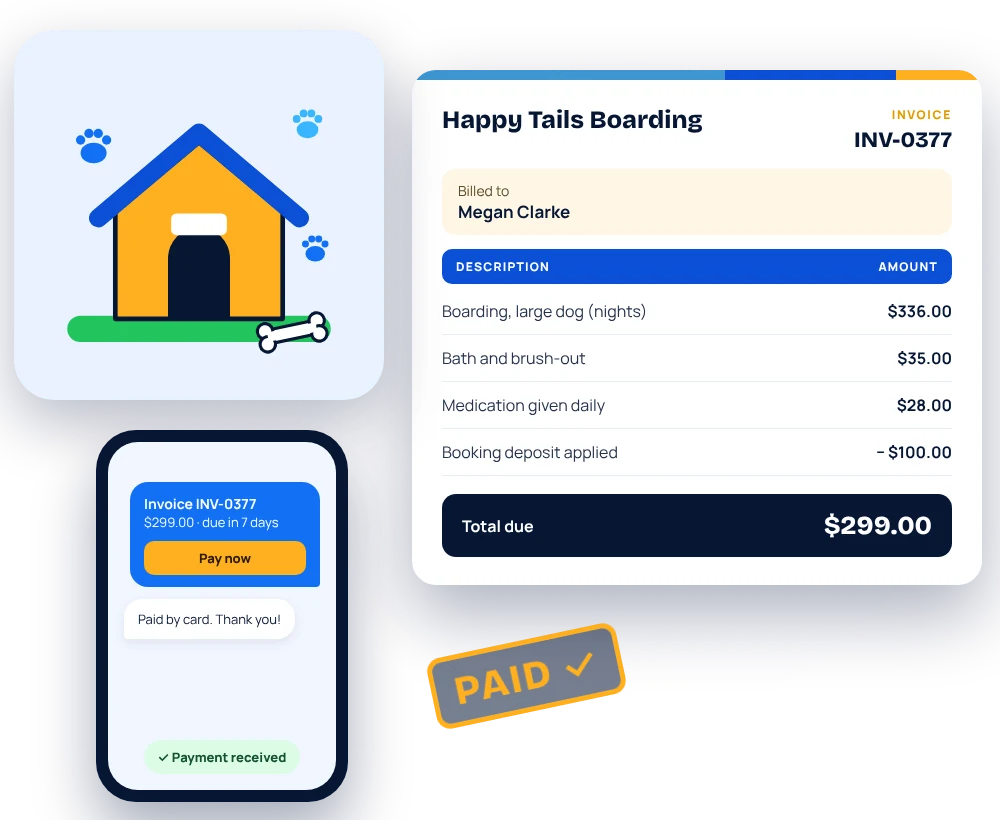
A week’s stay with extras and the deposit applied. A custom field can show the pet’s name on the invoice.
Tips to get paid faster for boarding and daycare
- Ask for a deposit on holiday bookings. It cuts last-minute cancellations at your busiest times.
- Have the invoice ready before pick-up. Prepare it the evening before so the owner can pay as they arrive.
- Bill daycare in advance. Weekly or monthly invoices at the start of the period keep regulars paid up.
- Make paying by phone easy. A Pay now link in a WhatsApp message is quicker than a queue at the card machine.
Free for 5 invoices a month
Every template, the tax settings, quotes, online payments and reminders are on the free plan. Pro removes the monthly limit when you need more.
Start free Compare the free plan and ProQuestions from boarding and daycare owners
New to invoicing? Read our guide on how to write an invoice.
Can I take a deposit when a stay is booked?
Yes. Send an advance invoice for the deposit. When the stay ends, use the paid deposit on the final invoice and only the balance is due.
Does it manage bookings and kennel space?
No. GlobalInvoiceHub handles invoices and payments. Keep using your booking system or calendar for availability and kennel plans.
Can I bill a regular daycare dog every week?
Yes. Set up a recurring invoice every week or every month for that owner. On the free plan you can run one recurring invoice; Pro has no limit.
Can owners pay by card?
Yes. Connect your own Stripe, Razorpay or PayPal account and every invoice gets a Pay now button. The money goes straight to your account.
Can I show the pet’s name on the invoice?
Yes. Create a custom field called “Pet name” in Settings, choose to print it, and fill it in on each invoice.
Invoicing software for other businesses
GlobalInvoiceHub is invoicing software for small businesses of every kind. See how it works for these trades too, or browse every industry.
Clients in other countries, their currency, deposits and the right tax. Invoicing software for consultants
Monthly retainers, hourly work, milestones and expenses on one invoice. Invoicing software for cleaning businesses
Weekly and fortnightly cleans billed on their own, plus one-off deep cleans. Invoicing software for landscaping
Regular lawn care billed monthly, plus deposits for bigger installs. Invoicing software for roofing contractors
Estimates, deposits, progress payments and change orders for roof jobs. Invoicing software for pool services
Weekly service billed monthly, chemicals and repairs added as needed. Invoicing software for law firms
Hourly and flat-fee matters, retainers and matter numbers on invoices. Invoicing software for glass and glazing
Measured quotes, a deposit before glass is ordered, balance on install. Invoicing software for security companies
Installation quotes with deposits and monthly monitoring contracts.
Send your first invoice today.
Free for 5 invoices a month. No card, no setup.
Create free invoiceAlready have an account? Log in