
You can add a customer from Customers › New customer, or while creating an invoice with + New customer. Saved customers are picked in a second on every new invoice.
-
1Who is the customer?
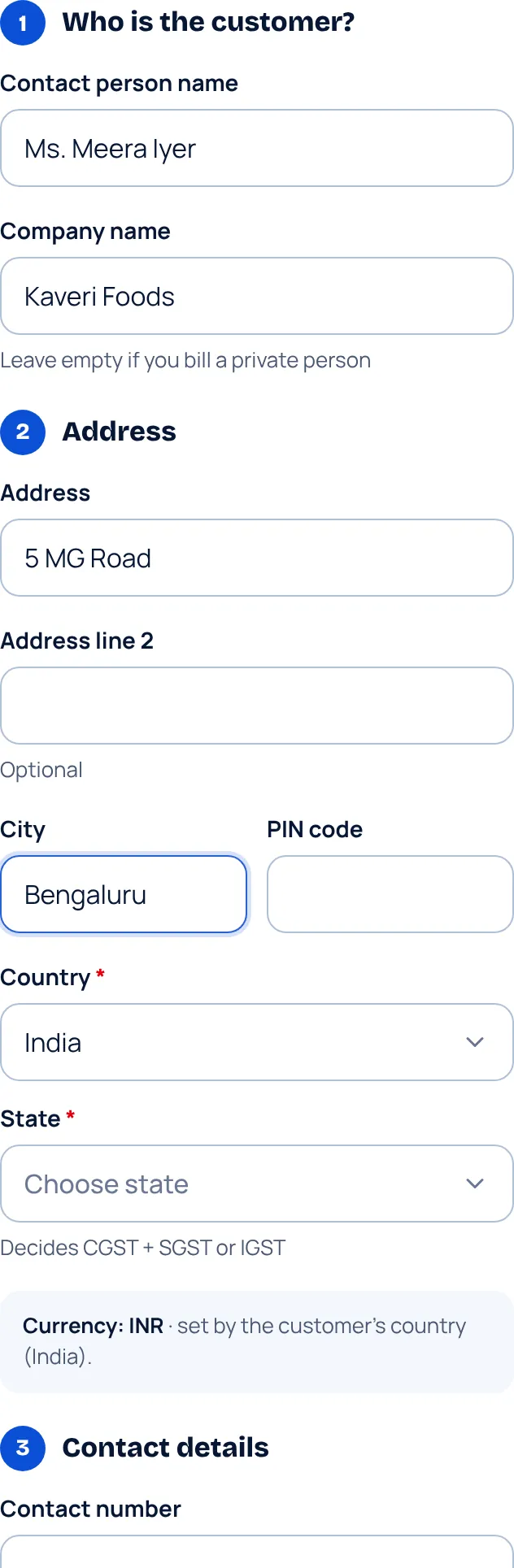
Enter the contact person exactly as it should be printed, for example “Mr. Sanjay Rao”, and the company name. Leave the company empty if you bill a private person. On the invoice the person is shown first, then the company.
-
2Address, country and state
Address and City are required: they are printed on the invoice, as tax invoices need them.
The Country sets the customer’s currency. In India the State decides whether you charge CGST + SGST (same state as you) or IGST (another state). See GST invoices.
-
3Contact details
Add an email to send invoices straight from the app (several addresses can be added when sending). A contact number is optional.
-
4Tax details
If the customer has a tax number, choose its type and enter it. An Indian GSTIN has 15 characters, for example 33AABCS1234L1Z9, and is printed on your invoice so they can claim input tax.
Choose SEZ unit or developer only if the customer is in a Special Economic Zone: those supplies are zero-rated under your LUT. Use Add a different delivery (Ship to) address when goods go somewhere else.
Good to know
- Changed a customer’s address after creating an invoice? Invoices that were not sent yet take the new details automatically. For a sent invoice, use Edit › Update the customer’s details on this invoice.
- Moving from another app? Import all your customers at once: see import from another app.
Questions
Why is the address required?
A tax invoice must show the buyer’s address, and it helps your customer’s accounts team match the invoice. Address and City are required; the rest is optional.
Can I bill a private person?
Yes. Leave the company name empty and enter the person’s name.