
A recurring invoice makes a new invoice on the dates you choose. Use it for monthly maintenance, retainers, rent or anything you bill the same way again and again.
-
1Start from an invoice
Open an invoice you send every month and press Make it recurring, or go to Recurring › New. The customer and items are copied.
-
2Choose when to bill
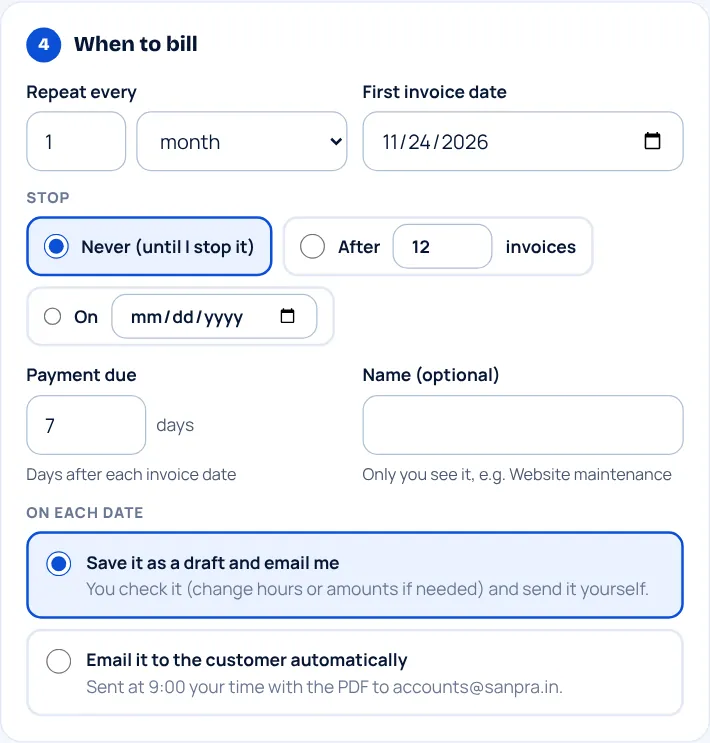
Under When to bill choose how often (every 1 month, 3 months, 1 year…), the first invoice date and when to stop: never, after a number of invoices, or on a date.
Then choose what happens on each date: Save it as a draft and email me, so you can check hours or amounts first, or Email it to the customer automatically at 9:00 your time with the PDF.
-
3Pause or change it
Open Recurring in the menu to see the next date, pause, change or stop a recurring invoice. Changes apply to the invoices made after that.
Good to know
- If Recurring is not in your menu, show it in Settings › Features.
- Each recurring invoice counts as one invoice in the month it is made.
Questions
What happens if I change the price?
Edit the recurring invoice; the next invoices use the new price. Invoices already made are not changed.